

Save data in
the cloud
the cloud
Back4app handles everything you need to store data securely and efficiently in the cloud. Store basic data types, including locations and photos, and query across them without spinning up a single server.
How it works - a javascript example

How it works - a javascript example
- 1 - Connect your app to the cloud using the SDK
-
1.1 - Install Parse SDK direct on your webpage, inside the <head> tag, using the code below:
After that run the following command on your terminal:
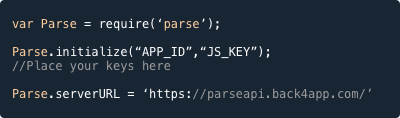
- 1.2 - Then just initialize the Parse SDK on your Page:
-
- 2 - Save data with ease
Save flexible data objects to the cloud with SDKs for every platform. No servers necessary. Work with native objects in just a few lines of code. We do all the hard work.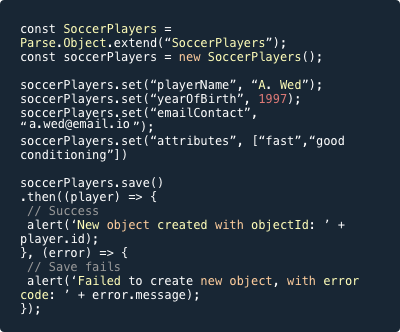
-
3 - Query any data Saving data to Back4App database is easy, but it's even easier to get that data from it.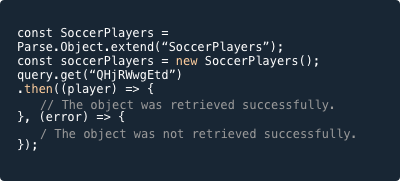
Happy coding :)
- Back4App Team
- Back4App Team
NOTE: If you need a hand to help on your next big project, talk to our Software Development Certified Partners.
|
Comments
Post a Comment